
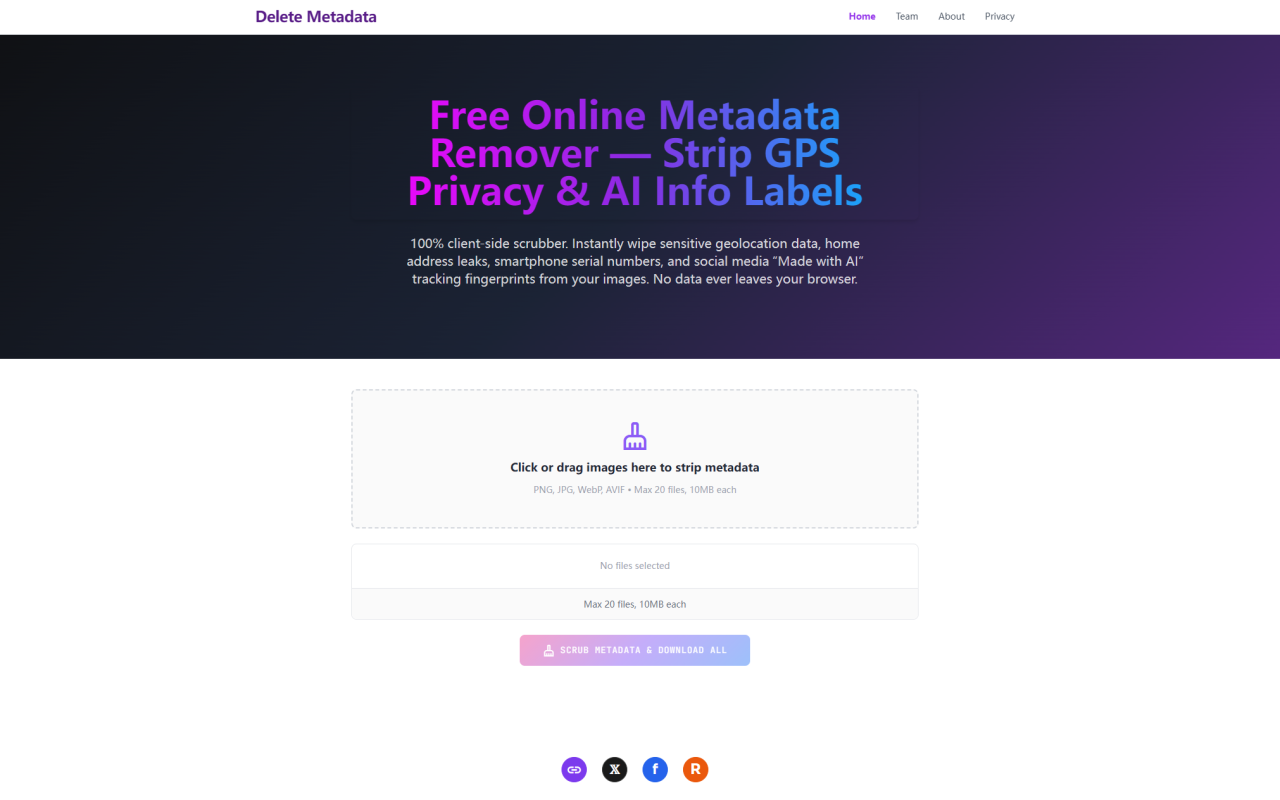
First Impressions: A Sparse but Purposeful Interface
Upon visiting DeleteMetadata.com, the first thing you notice is how minimal the page is. There is no clutter, no sign-up prompt, and no obtrusive advertising. The entire screen is dominated by a central drop zone with the text "Click or drag images here to strip metadata." Below it, you see the supported formats — PNG, JPG, WebP, and AVIF — along with the constraints: a maximum of 20 files per session, each capped at 10 MB. The tool is built and maintained by the 345tool collective, a small team that specializes in purely client-side, privacy-first web utilities. There is no pricing page anywhere on the site because this entire service is completely free. No hidden tiers, no premium upgrades, no usage limits beyond the session caps. That rare combination — genuinely free, no account required, and zero server-side processing — sets the tone immediately.
How It Works: The Canvas Rendering Pipeline
DeleteMetadata.com uses a clever technical approach that distinguishes it from conventional metadata scrubbers. Most desktop tools attempt to parse the binary structure of a file, locate metadata segments like EXIF or XMP, and surgically remove them. That method is brittle and format-specific, often leaving residual fragments behind. This tool bypasses that entirely. When you drop an image onto the drop zone, the browser loads it using the native HTML5 Canvas API. The drawImage() method effectively instructs the codec to render only the visible pixel data — the RGBA color matrix — onto an offscreen canvas. Every piece of metadata, from GPS coordinates to C2PA AI provenance credentials, is discarded by the browser during this decoding step because the rendering engine simply does not pass that data through to the canvas. The result is a raw pixel grid containing zero hidden information. The tool then serializes that clean pixel matrix into a fresh PNG file using Canvas.toBlob(), constructing an entirely new file from scratch. The output is always lossless PNG, which the site explains is intentional: PNG avoids the re-injection of tracking telemetry that can occur with other formats.
Beyond File Metadata: LSB Steganography Neutralization
What surprised me most while testing was an extra layer of protection that the tool applies beyond standard metadata removal. After the canvas-based pixel extraction, the tool performs a second pass that zeroes out the least significant bit of every red, green, and blue color channel across the entire image. This is a deliberate defense against LSB steganography — a technique where hidden messages or tracking markers can be embedded directly into pixel color values rather than in the file header. The change to each channel is at most ±1 on a 0–255 scale, which works out to roughly a 0.4% variance — far below the threshold of human visual perception. In practice, images I processed looked identical to their originals when inspected side by side. However, this operation does mean that any intentional steganographic payload embedded in the pixel data — such as invisible watermarks — is also destroyed. The site acknowledges this trade-off honestly, noting that creators who want to preserve embedded ownership markers should use the team's sister application, StegTool.com, instead. That level of transparency about a limitation is refreshing.
Testing the Workflow: Batch Processing and Individual Downloads
I tested the tool with a batch of ten JPEG images, some containing GPS coordinates I had deliberately captured with location services enabled, plus one WebP file that I knew contained C2PA credentials from a generative AI upscaling tool. The upload process is instantaneous because nothing actually uploads — processing happens entirely in the browser's memory. The interface displays a progress indicator reading "Scrubbing Privacy Logs & Removing AI Labels…" while it works through the batch. After a few seconds, the button changes to a sequential download prompt. Instead of bundling files into a ZIP archive — which the site argues creates accessibility problems on mobile devices lacking native archive managers — the tool streams each cleaned file individually to the browser's download folder. This worked smoothly during my test, though processing ten 8 MB images pushed my laptop's fan to spin up noticeably. The 10 MB per-image limit is a real constraint for high-resolution photographs shot in RAW or uncompressed camera formats. Users working with DSLR or mirrorless camera files will likely need to resize or compress their images before processing them through this tool. For typical social media images, phone photos, and web graphics, however, the limit is generous enough.
What Gets Removed: A Full Audit of Metadata Stripping
To verify the claims, I ran both the original and processed files through an independent EXIF viewer. The original JPEGs contained the expected EXIF data: camera model (iPhone 14 Pro), firmware version, aperture and shutter speed, GPS coordinates (latitude and longitude exact to the second), and an IPTC copyright field. The processed PNG files returned zero metadata fields — no EXIF, no IPTC, no XMP, no C2PA manifest, and no MakerNote blocks. The WebP file that initially showed a C2PA Content Credential signature in its original form came out entirely clean as well. This comprehensive removal covers everything the site advertises: device tracking logs, GPS geolocation telemetry, editing software signatures, AI provenance markers, ICC profiles, embedded thumbnails, and proprietary camera notes. For privacy-conscious users, the result is exactly what you want — a visually identical file that carries no forensic trace of its origin or editing history. For creators who rely on IPTC copyright fields for photo credit management, the complete wipe may be too aggressive. The tool does not offer selective stripping options; it removes every metadata category universally. If you need to preserve your copyright byline while deleting GPS coordinates, this all-or-nothing approach will not fit your workflow.
Who This Tool Serves and Where It Falls Short
DeleteMetadata.com is clearly designed for a specific audience: anyone who shares images online and wants to strip all hidden tracking data before publishing. That includes marketplace sellers photographing items at home, journalists protecting sources, travelers avoiding geolocation leaks, and digital artists using AI tools who want to avoid the reach-suppressing "Made with AI" labels that platforms now apply to C2PA-tagged content. The tool is also valuable for compliance — organizations handling images under GDPR or CCPA regulations can use it as a final sanitization step before public distribution. The limitations are equally clear. The single-format PNG output is a limitation if you need to deliver JPEGs or WebP files specifically. The 10 MB cap excludes many high-resolution camera outputs. The lack of selective metadata options means you cannot choose to keep your copyright info while deleting GPS data. And because all processing is local, performance depends entirely on your device's hardware — older computers will struggle with large batches. Pricing details are not publicly listed on the website because the tool is entirely free, with no paid plans, subscription tiers, or usage quotas. That is a genuine strength, especially compared to subscription-based competitors, but it also raises a practical question about long-term sustainability that the 345tool collective does not address on the site.
Delete Metadata delivers exactly what its name promises: a fast, reliable, client-side metadata eraser that handles modern AI tracking data as effectively as it handles traditional EXIF. It is not a comprehensive media management suite and it does not pretend to be. For the specific job of taking image files from camera-ready to web-ready without broadcasting your digital footprint, it is one of the cleanest and most honest tools I have tested. Visit Delete Metadata at https://deletemetadata.com to explore it yourself.


댓글